ChatGPT and Claude are both among the most capable AI assistants available today, but neither is objectively “better” for everyone. ChatGPT generally offers broader capabilities, including coding, multimodal interactions, image generation, web browsing, and a rich ecosystem of tools. Claude is widely appreciated for its thoughtful writing, long-context document analysis, and careful reasoning. The best choice depends on what you want to accomplish, how you work, and which features matter most to you.
Choosing between Claude and ChatGPT has become one of the most common questions among students, professionals, developers, marketers, and businesses adopting AI. Both platforms have evolved rapidly, moving beyond simple chatbots into comprehensive productivity assistants capable of writing, coding, analyzing data, brainstorming ideas, and supporting complex workflows.
Rather than declaring a single winner, it’s more useful to compare where each assistant performs well, where they differ, and which users are likely to benefit most from each.
Understanding the Core Philosophy
Although both tools are built on large language models (LLMs), they emphasize different strengths.
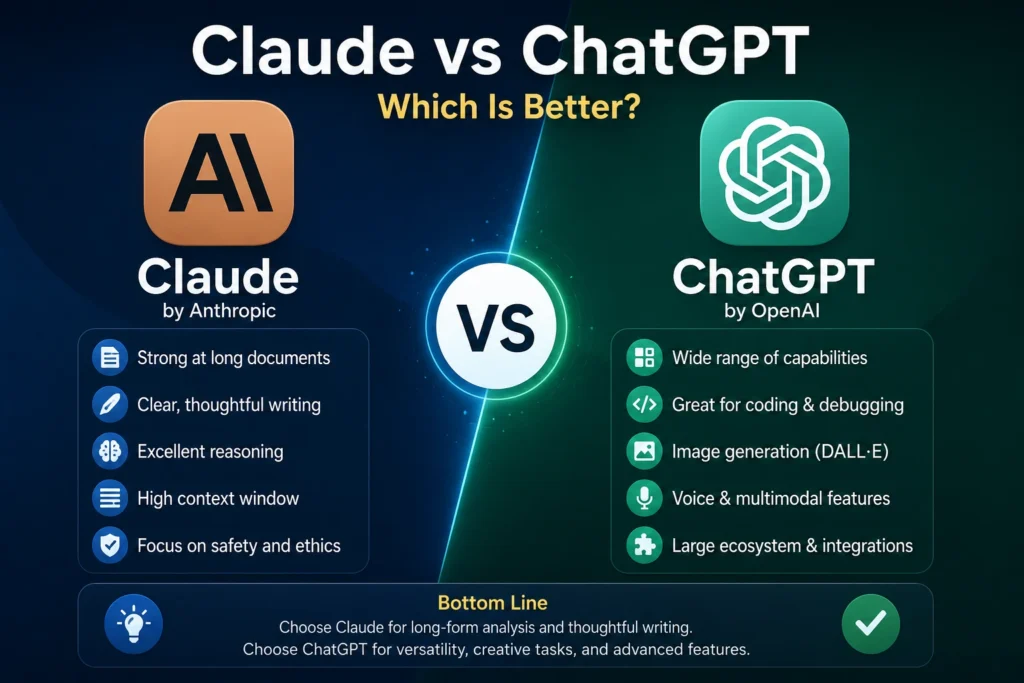
ChatGPT, developed by OpenAI, focuses on being a versatile AI assistant that supports a wide variety of tasks through conversation, integrated tools, and multimodal capabilities. It aims to help users across creative work, software development, education, research, productivity, and business.
Claude, developed by Anthropic, emphasizes clear reasoning, careful responses, and handling lengthy documents. Many users appreciate its structured writing style and ability to maintain coherence across large amounts of text.
These differences influence the overall experience more than benchmark scores alone.
Feature Comparison at a Glance
| Feature | ChatGPT | Claude |
|---|---|---|
| Conversational AI | Excellent | Excellent |
| Long document analysis | Excellent | Excellent, especially for large documents |
| Creative writing | Excellent | Excellent |
| Technical writing | Excellent | Excellent |
| Coding assistance | Excellent | Very strong |
| Image generation | Built-in (supported plans) | Not a primary feature |
| Image understanding | Yes | Yes |
| Web browsing | Available | Available on supported plans |
| Voice conversations | Available | Limited compared with ChatGPT |
| Custom GPTs / AI assistants | Yes | No equivalent ecosystem |
| Data analysis | Strong | Strong |
Both platforms continue to evolve, so available features may vary depending on subscription tier and future updates.
Writing Quality
For many users, writing quality is the first noticeable difference.
ChatGPT
ChatGPT adapts well to different writing styles.
It can produce:
- Blog articles
- Technical documentation
- Marketing copy
- Emails
- Reports
- Social media content
- Educational materials
- Business proposals
One of its strengths is flexibility. It can shift from highly technical language to conversational writing with relatively little prompting.
Claude
Claude is frequently praised for:
- Natural paragraph flow
- Careful explanations
- Consistent tone
- Strong editing suggestions
- Clear summaries
Some users find Claude’s responses feel slightly more restrained or formal, while others appreciate that style for professional writing.
For everyday writing tasks, both perform exceptionally well.
Coding Capabilities
Developers increasingly rely on AI assistants throughout the software development lifecycle.
Common use cases include:
- Explaining code
- Debugging
- Refactoring
- Documentation
- Unit tests
- SQL queries
- API integration
- Learning programming languages
ChatGPT offers an extensive development experience, particularly when combined with code execution, advanced reasoning models, and integrations.
Claude is also highly capable, especially for reviewing large codebases and explaining complex logic.
Neither completely replaces experienced developers, but both can significantly accelerate software development.
Research and Learning
Students, researchers, and professionals often use AI to understand unfamiliar topics.
Both assistants can:
- Explain concepts
- Summarize articles
- Compare ideas
- Generate study plans
- Create practice questions
- Break down technical material
The quality of learning depends less on which model you choose and more on how you ask questions.
Providing context and asking follow-up questions usually leads to better educational outcomes.
Long Context Windows
One area where Claude has built a strong reputation is handling lengthy documents.
Examples include:
- Contracts
- Research papers
- Books
- Company policies
- Large reports
- Technical documentation
Users working with extensive text often appreciate Claude’s ability to maintain consistency across long conversations.
ChatGPT has also significantly expanded its context capabilities and performs well with substantial documents, especially when paired with its document-upload and analysis features.
For most everyday users, both provide more than enough capacity.
Creativity and Brainstorming
Creative work includes much more than writing stories.
Professionals brainstorm:
- Business ideas
- Product names
- Marketing campaigns
- Course outlines
- Presentation topics
- User experiences
- Startup concepts
ChatGPT generally produces a wider variety of creative directions, making it useful during early brainstorming.
Claude often produces more structured, carefully reasoned suggestions.
The better choice depends on whether you want exploration or refinement.
Business Productivity
AI has become part of daily business operations.
Common productivity tasks include:
- Drafting emails
- Summarizing meetings
- Creating presentations
- Organizing projects
- Writing reports
- Planning workflows
- Document editing
ChatGPT’s expanding ecosystem—including custom assistants, integrated tools, image generation, and automation features—makes it particularly attractive for businesses looking to consolidate multiple workflows.
Claude remains an excellent option for organizations focused primarily on document-intensive work.
Accuracy and Reliability
Neither AI assistant is perfect.
Both can occasionally:
- Misinterpret prompts
- Present incorrect facts
- Misunderstand context
- Generate outdated information without access to current sources
For important decisions involving law, medicine, finance, engineering, or compliance, AI outputs should always be verified using authoritative sources.
The quality of prompts also plays a major role in response quality.
Ease of Use
Both interfaces are designed for conversational interaction.
However, ChatGPT offers a broader collection of built-in capabilities, including:
- Image generation
- Voice interaction
- Data analysis
- File uploads
- Custom GPTs
- Coding assistance
- Web browsing (where available)
Claude focuses on a clean, distraction-free interface that many users find intuitive.
The experience depends on whether you prefer simplicity or a more feature-rich environment.
Which AI Is Better for Different Users?
Students
Both are excellent.
Choose based on which explanations you personally find easier to understand.
Content Writers
Both assist with:
- Research
- Outlines
- Editing
- SEO writing
- Content expansion
- Summaries
Many professional writers use multiple AI tools rather than relying on one exclusively.
Developers
Both provide strong programming assistance.
ChatGPT’s broader tool ecosystem may appeal to developers working across coding, testing, documentation, and automation.
Claude remains highly regarded for reviewing complex code and explaining implementation details.
Researchers
If your workflow revolves around lengthy reports and document analysis, Claude may feel particularly comfortable.
If your work combines research with data analysis, coding, visualization, and broader productivity tasks, ChatGPT offers additional flexibility.
Business Professionals
Professionals managing multiple responsibilities often benefit from ChatGPT’s wider range of integrated features.
Those primarily reviewing large documents may appreciate Claude’s strengths.
Pricing Considerations
Both companies offer free access with usage limits and paid subscription options that unlock more advanced models and higher limits.
Rather than choosing solely based on subscription cost, consider:
- Daily usage volume
- Required features
- Document size
- Coding needs
- Collaboration requirements
- Available integrations
A lower-priced plan that lacks critical features may ultimately provide less value.
Common Misconceptions
“One AI Is Always Smarter”
Performance varies depending on the task.
One assistant may produce a better answer for programming while the other excels at editing a lengthy report.
“AI Replaces Human Expertise”
Neither system replaces professional judgment.
The highest-quality work typically comes from collaboration between human expertise and AI assistance.
“Benchmark Scores Tell the Whole Story”
Public benchmarks measure specific capabilities under controlled conditions.
Real-world productivity depends on usability, workflow integration, reliability, and how effectively the AI supports your specific goals.
Decision Framework
Instead of asking which AI is universally better, ask yourself these questions:
- Do I need advanced productivity tools beyond conversation?
- Will I frequently work with large documents?
- Do I want image generation and multimodal features?
- Is coding a major part of my workflow?
- Will I use AI daily for business tasks?
- Do I value a larger ecosystem of integrations?
Your answers will likely point toward the platform that best fits your needs.
Practical Takeaways
For many users, ChatGPT stands out as the more versatile all-around AI assistant thanks to its broad feature set, multimodal capabilities, coding support, image generation, voice interaction, and expanding ecosystem of tools. It’s well suited for professionals, developers, marketers, educators, and anyone looking for an AI that can support a wide variety of daily tasks in one place.
Claude remains an outstanding choice for users who prioritize thoughtful writing, document-heavy workflows, and clear, structured explanations. Its strengths make it especially valuable for researchers, analysts, editors, and professionals who spend much of their day working with extensive text.
Rather than viewing the platforms as direct competitors with a single winner, it’s more accurate to see them as two highly capable AI assistants with overlapping strengths and different areas of emphasis. The best choice depends on your workflow, the problems you’re solving, and the features you’ll actually use every day.
